

How To Find Username And Password Windows 10
Elevation 2 Options to Retrieve Windows 10 User Account Login Countersign
Information technology is known that we e'er log in our Windows 10 calculator by crossing Microsoft account or Admin account. If you forgot the login password, you volition exist unfortunately locked out of your Windows 10 desktop/laptop. Quite many of my friends complained they are non able to detect some effective options to retrieve/reset Windows 10 user login password they forgot without disc/disk. Then here I volition provide top two options for those who get confused of how to change Windows 10 user account login password.
Selection 1: Create a New User Account Login Password in Windows ten with Command
Choice 2: The Best Way for Windows ten User Account Login Countersign Reset
Option 1: Create a New User Account Login Password in Windows x with Command
Wondering how to recover your forgotten login countersign for local user password and get access your Windows x reckoner? Just follow the steps beneath to bypass lost Windows 10 Admin password.
i. Burn a DVD/CD/USB in a normal estimator and insert it into your attacked Windows 10 estimator.
ii. Disable UEFI in the reckoner and make information technology boot from DVD/CD/USB.
3. Printing Shift + F10 to open up Command Prompt.
4. Run commands to type cmd.exe to supervene upon utilman.exe.

5. Extract DVD/CD/USB and restart your Windows x. When the Windows 10 sign-in page comes out, move the mouse to the Utility Manager icon.
6. Create a new user account and add information technology to Windows x local administrator grouping by typing the following contents.

seven. When you lot click the Windows login screen, you lot can suspension into your Windows ten without password through the created account.
Option two: The Best Way for Windows ten User Business relationship Login Countersign Reset
It's believed that yous will call back the start option is not really unproblematic to carry. No worries. Here volition the best style for you to skip Windows login screen without password.
Windows Password Fundamental is a World'southward leading Windows Password Recovery Tool, which volition greatly assistance y'all reset lost Ambassador passwords on any Windows 10/8.1/8/seven/XP/Vista system without reformatting or reinstalling your organization. As well, information technology fulfills your need to reset forgotten login password for Microsoft account in windows 10.
How to Reset Login Password for User Business relationship in Windows 10
i.Download and install the Windows Password Key in any other estimator you lot tin become admission to.
two.Launch it to burn a DVD/CD/USB with the default ISO image file or a new one.
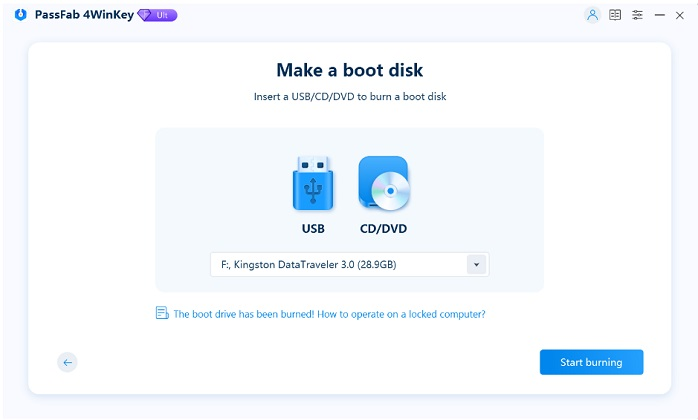
three.Insert newly created CD/DVD/USB into your locked figurer and reboot your PC from CD/DVD/USB disk: press "F12" to enter "Boot Menu". Select CD/DVD/USB disk from the listing and so hit "Enter".
Note:Please disable the UEFI in your Windows 10 firstly.
four.Select the user account which you want to recover countersign and click "Remove Windows Password". Then click "Next" to ostend and the original password volition show. Now you lot can sign in computer without password.
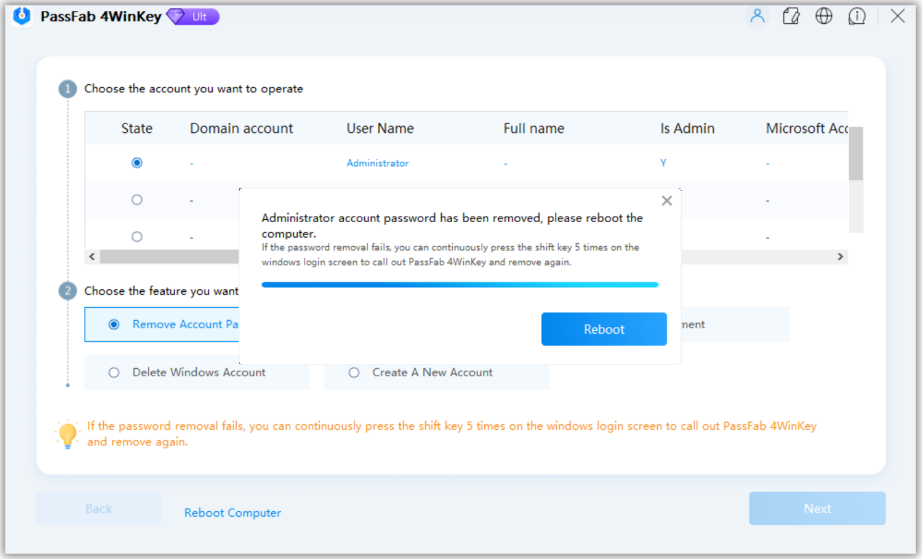
No matter which meridian option you cull in a higher place, both of them volition back up you to crack Windows 10 user login password as you hope. Just advisedly follow the steps to retrieve or reset your login password.
- Related Articles
- Peak Fashion to Reset/Remove Windows 10 Password without Reset Disk or Third-political party Software
- How to Change Windows 10/8.1/eight/7 Administrator/Domain Password
- Locked out of Laptop after Windows 10 Update, How to Modify Countersign
comments powered by
Source: https://www.4winkey.com/windows-10/top-2-options-to-retrieve-windows-10-user-account-login-password.html
Posted by: carrollkhorde.blogspot.com
0 Response to "How To Find Username And Password Windows 10"
Post a Comment